Pigeons - SSH to any machine without an IP address
by Rüdiger KlaehnYou have probably heard the news: as developers who don't work for megacorporations, we are locked out from using the latest US frontier models. Both Anthropic Claude Mythos/Fable and "Open"AI ChatGPT 5.6 are as of now only available for select large US companies.
This is very annoying, but also a welcome opportunity to play with open source models. Models like GLM are surprisingly capable.
But they do require a machine with a lot of GPU-accessible memory to run locally. Nothing you can get in a reasonably priced notebook.
You want to run the model on a big box in your basement and then access it from wherever you are using your work notebook.
We had this problem at number0, and have written a tool for it, using iroh.
The usual way to access a remote machine is ssh. But ssh out of the box works only with hostnames and IP addresses. So you would have to somehow expose your big machine under a publicly available IP address.
DynDNS
This is not impossible of course. If you have an internet service provider where you get a public IP, you can set up dyndns to give your changing external IP a stable name. Then - if you have a home router that supports it - you can set up port forwarding from the router to a port on your big server.
But it is a lot of configuration work, and also does not work at all if you have an internet service provider that uses CGNAT and doesn't give you a public IP for your router.
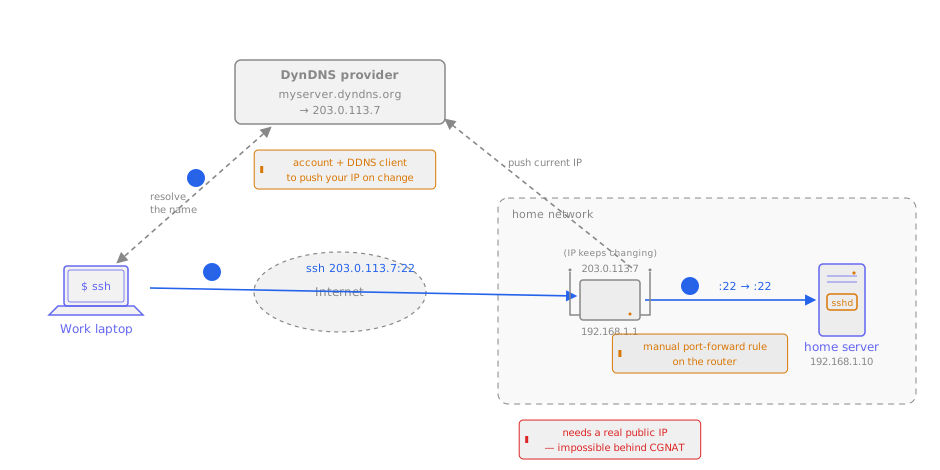
With iroh we can make this whole process completely painless and also make it work for providers with CGNAT.
Pigeons
We have written a small tool called pigeons that takes the approach from dumbpipe and integrates it with ssh.
The roost
On the server side you start a small process that binds to an iroh endpoint and forwards incoming connections to the local ssh daemon.
You don't need any additional configuration on the server side. Also, it is sufficient for the local ssh daemon to listen on localhost.
> pigeons roost
roost is running! id: bb8e1a5661a6dfa9ae2dd978922f30f524f6fd8c99b3de021c53f292aae74330
Pigeons fly!
On the client side there is a tiny bit of setup needed. But the tool does this for you, no need to get your hands dirty with manually editing your ssh config.
> pigeons add --id bb8e1a5661a6dfa9ae2dd978922f30f524f6fd8c99b3de021c53f292aae74330 --name beast
Pigeon route 'beast' added to ~/.ssh/config

  Fly with: ssh user@beast
Then all it takes to connect to the machine is this:
ssh user@beast
This works by configuring a Host entry in the ssh config that has pigeons as a ProxyCommand:
Host beast
    ProxyCommand pigeons fly --stdio bb8e1a5661a6dfa9ae2dd978922f30f524f6fd8c99b3de021c53f292aae74330
    UserKnownHostsFile /dev/null
    StrictHostKeyChecking no
The connection will be encrypted by ssh, but then additionally encrypted by iroh.
You might wonder why we disable host-key checking: we already check the identity of the remote using the iroh endpoint ID, so it is not needed. beast is an alias for the iroh remote endpoint, not the ssh host key. If you want to be warned when the remote ssh host key changes, just remove these lines from the config. Pigeons will work just fine without them.
Why not use {ZeroTier, Netmaker, NetBird, Nebula, Tailscale}?
There are many existing tools that allow you to do something similar. But they all work at the device level and are more intrusive: they all create virtual network devices, rewrite the routing tables, and need root access to do so.
Pigeons roost is just a user space process that doesn't need any elevated privileges, just the ability to use networking.
Note that if you have root privileges and want to have access to the entire machine, there is nothing wrong with the device-level approach. There is even an iroh-based peer-to-peer network interface called iron.
To get started, take a look at our docs, dive directly into the code, or chat with us in our discord channel.